
The paper notebook reinvented for the digital age
Remember the feeling of cracking open a fresh notebook — the promise of a blank page, the scratch of pen on paper?
What if you could keep that tactile satisfaction and have every page instantly searchable, shareable and backed up?
That’s the promise of reMarkable’s Paper Pro.
This new color e‑ink tablet has become the talk of tech‑heads and note‑taking nerds alike because it delivers a writing experience so natural that even pencil‑on‑paper purists are getting FOMO.
A colorful revolution on e‑ink
Earlier e‑ink tablets only offered monochrome scribbling. The Paper Pro’s Canvas Color display changes everything.
It blends nine base colors into tens of thousands of shades, giving your notes and sketches real depth. With a resolution of 2160 × 1620 pixels and 229 ppi, text and drawings look sharp and detailed. reMarkable’s engineers achieved this by embedding millions of color‑ink particles under the glass, resulting in more saturated tones and natural blending than typical e‑ink panels.
The 11.8‑inch screen is also huge for a paper tablet, almost matching a letter‑sized page. It’s large enough for annotating PDFs, drawing diagrams or laying out complex ideas, but still slim and portable. Thanks to an adjustable front light, you can work at night without harsh blue light — the display reflects natural light and reduces eye strain.
Paper‑like feel with lightning‑fast responsiveness
A note‑taking device lives or dies by its feel. The Paper Pro uses a textured glass coating so your pen glides and scratches like real paper . The pen‑to‑ink distance is less than one millimeter, making strokes appear instantly as you write. Reviewers at 9to5Mac found the experience eerily similar to writing on paper: the 12 ms latency is fast enough that there’s no perceivable lag and the textured glass convincingly mimics the drag of a notebook.
The premium Marker Plus stylus snaps magnetically to the tablet and includes an eraser on the back. Tilt detection and a finely textured grip make it comfortable for long sessions. The tablet’s chassis itself is only 5.1 mm thick and made from grooved aluminum, giving it a premium feel while weighing about 525 g.
Productivity without distractions
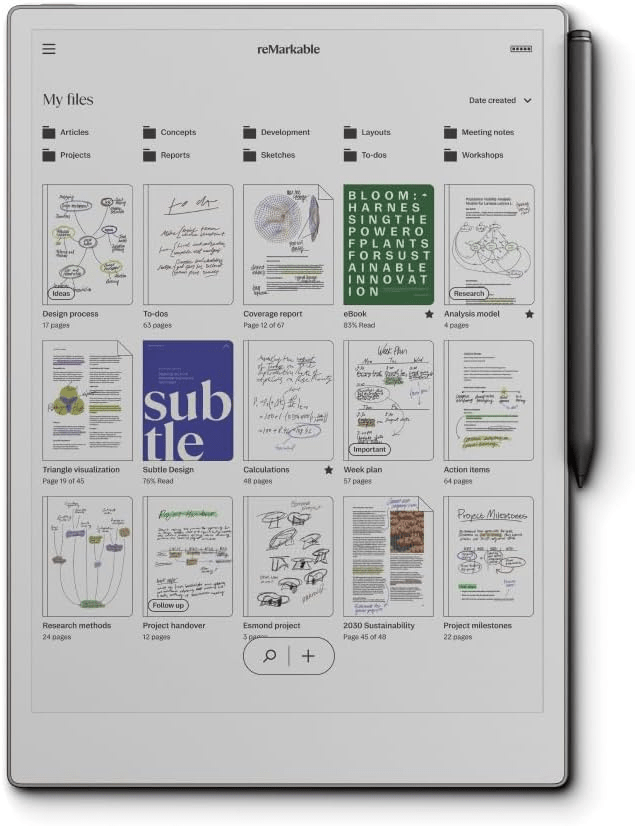
Unlike a general‑purpose tablet, the Paper Pro is intentionally minimalist. There are no third‑party apps or web browser — just a clean interface that lists your notebooks, PDFs and e‑books. You can tag or favorite files to organize them and jump quickly between a grid or list view. This singular focus means you spend your time thinking and writing rather than bouncing between apps.
Despite the streamlined software, the Paper Pro does support modern workflows. reMarkable’s companion app lets you sync files from your phone or computer, and there’s integration with Dropbox, Google Drive and OneDrive for cloud transfer. You can even borrow library e‑books in ePub format and mark them up like a printed book. For team collaboration, a Connect subscription offers unlimited cloud storage, cross‑device syncing and exclusive templates.
Long battery life and true portability
One of the Paper Pro’s biggest advantages over LCD tablets is battery life. reMarkable quotes up to two weeks on a single charge, and reviewers confirm that real‑world battery life is about that long. When you do need to recharge, the battery reaches around 90 % in about 90 minutes. Combined with its slim 5.1 mm profile and just‑over‑half‑kilogram weight, this makes it a perfect travel companion. Slip it into your bag like a legal pad and go.
Built for organized thinking and collaboration
Color isn’t just pretty; it’s functional. With the Paper Pro you can use color to highlight important passages, categorize tasks or map out mind‑bending diagrams. The device supports writing directly on PDFs, and two‑finger swipes create extra space to jot side‑notes or extended commentary. Folders, tags and virtually limitless pages keep your notes neatly arranged and searchable.
When you need to share your work, the Paper Pro integrates with email and cloud services, so you can send annotated documents or export your handwriting as typed text. reMarkable’s conversion tool turns your scribbles into editable text, which is perfect for meeting minutes or brainstorming sessions. An optional Type Folio keyboard accessory attaches like a case, letting you alternate between typing and handwriting depending on the situation.
What’s in the box?
Amazon’s bundle includes everything you need to get started: the reMarkable Paper Pro tablet with its 11.8‑inch Canvas Color display, the Marker Plus pen with eraser, six replacement marker tips and a USB‑C charging cable. You don’t have to worry about buying extra pen nibs or cables up front — it’s all in the box.
Should you upgrade?
With a starting price of around US$629, the Paper Pro isn’t cheap, and a more powerful tablet like an iPad Air costs about the same. However, tech reviewers argue that this single‑purpose device provides immense value for professionals, students and artists because it removes the distractions of regular tablets while offering a truly paper‑like experience with color. If you’re a heavy note‑taker, journaled or someone who wants to organize thoughts without digital noise, the Paper Pro is a game‑changer.
Final thoughts: Join the paper‑digital revolution
The reMarkable Paper Pro is more than a gadget; it’s a new way of thinking. It combines centuries of paper‑based note‑taking with the flexibility of digital organization. Users who’ve adopted it report that it clarifies their thinking and sparks creativity. And because the hardware is built to last with repairable components and recycled materials, it’s a sustainable choice too.
Ready to level‑up your ideas? Join the thousands of creators, students and professionals who are ditching stacks of notebooks and embracing the reMarkable Paper Pro. Click here to check current pricing and experience the future of note‑taking.


 SIMCEL ONLINE
Leave a Reply