
Introduction
In today’s digital world, kids’ tablets have become a valuable tool for learning, entertainment, and communication. These devices offer educational apps, parental controls, and durable designs, making them ideal for young learners.
Whether you’re looking for a tablet for homeschooling, interactive learning, or safe online browsing, choosing the right kids’ tablet ensures a fun and educational experience while keeping children safe from inappropriate content.
This comprehensive guide will explore everything you need to know about kids’ tablets, including their benefits, features, types, and how to choose the best one for your child.
What is a Kids’ Tablet?
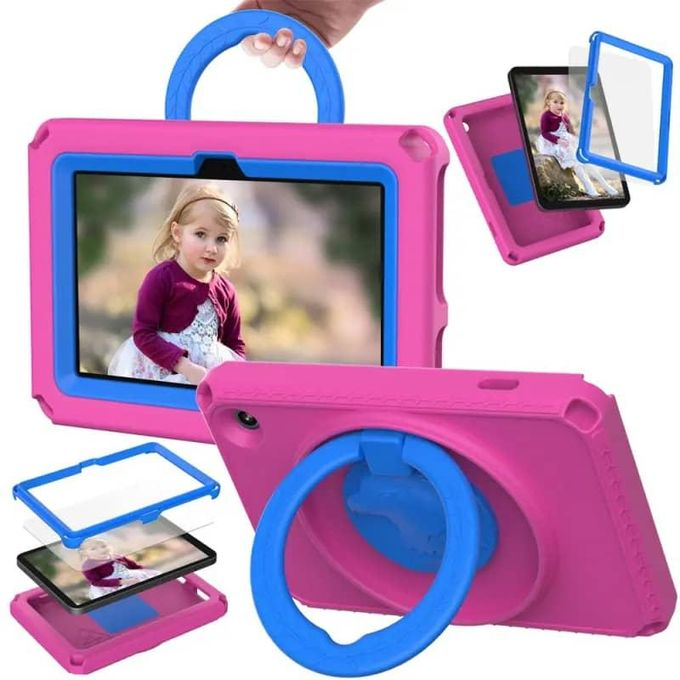
A kids’ tablet is a child-friendly digital device designed for learning, gaming, and entertainment. Unlike regular tablets, kids’ tablets come with:
- Parental controls for safe browsing.
- Durable cases to withstand drops and spills.
- Educational apps and games for interactive learning.
- Time management settings to limit screen time.
💡 Fun Fact: Many kids’ tablets are designed for ages 3–12, offering different content and features based on age groups.
Benefits of Kids’ Tablets
1. Enhances Learning & Creativity
- Tablets offer interactive learning apps for math, science, reading, and problem-solving.
- Kids can draw, code, and create stories using art and animation apps.
✅ Best For: Encouraging creativity, critical thinking, and early education.
2. Parental Control & Safety Features
- Parents can set screen time limits, control app downloads, and monitor activity.
- Filters ensure safe web browsing and block inappropriate content.
✅ Best For: Protecting children from online risks while ensuring a safe digital experience.
3. Kid-Friendly Design (Durability & Portability)
- Most kids’ tablets come with shockproof cases and scratch-resistant screens.
- Lightweight and portable, making them perfect for travel and long car rides.
✅ Best For: Preventing damage from accidental drops.
4. Encourages Independent Learning
- Educational tablets allow kids to explore new topics at their own pace.
- Many tablets come with pre-installed learning programs and kid-safe YouTube versions.
✅ Best For: Helping children learn independently.
5. Safe and Age-Appropriate Entertainment
- Tablets provide ad-free games, movies, and audiobooks.
- Platforms like Netflix Kids and Amazon Kids+ ensure safe entertainment.
✅ Best For: Balanced screen time with fun and learning.
Types of Kids’ Tablets
There are different types of kids’ tablets based on age group, content access, and features.
1. Basic Learning Tablets (For Ages 3–6)
- Pre-installed learning games and apps.
- Simple interface for young children.
- Durable with thick rubber cases.
✅ Best Choice: LeapFrog Epic, Amazon Fire HD Kids Edition
2. Educational Tablets (For Ages 6–10)
- Offers math, coding, and reading apps.
- Features parental control and time limits.
- Supports Wi-Fi for additional content access.
✅ Best Choice: Amazon Fire HD 10 Kids Pro, Samsung Galaxy Tab A Kids Edition
3. Advanced Kids’ Tablets (For Ages 10–12)
- Runs full Android or iOS apps.
- Great for homework, research, and online learning.
- Supports external keyboards and styluses.
✅ Best Choice: Apple iPad (with parental controls), Samsung Galaxy Tab S6 Lite
Key Features to Consider When Buying a Kids’ Tablet
1. Screen Size & Display Quality
- 7-inch (Compact for toddlers and travel).
- 8-inch – 10-inch (Best for learning and entertainment).
- Full HD screens for better viewing experience.
💡 Tip: Choose a larger screen for reading and videos.
2. Battery Life
- 4-6 hours (Basic kids’ tablets).
- 8-12 hours (Premium tablets for learning and entertainment).
💡 Tip: Longer battery life means fewer interruptions during learning or travel.
3. Parental Controls
- Screen time management (Set daily limits).
- App approval system (Parents decide which apps can be downloaded).
- Kid-safe browsers (Blocks unsafe content).
💡 Tip: Look for tablets with built-in parental control settings.
4. Durability & Protective Casing
- Shockproof cases protect against drops.
- Water-resistant designs (Some models are spill-proof).
💡 Tip: Choose a rugged case or bumper protector for younger kids.
5. Educational Content & App Compatibility
- Some tablets come with pre-installed educational programs.
- Compatibility with Khan Academy Kids, ABCmouse, and Duolingo.
💡 Tip: Pick a tablet that supports age-appropriate apps and learning platforms.
6. Storage & Performance
- 16GB–32GB: Good for basic apps and videos.
- 64GB+ (Expandable): Best for downloading more content.
💡 Tip: Choose a tablet with expandable storage for growing content needs.
7. Connectivity Options
- Wi-Fi-only models (For indoor use).
- Wi-Fi + Cellular (For learning on the go).
💡 Tip: Wi-Fi-only tablets are cheaper but require an internet connection for updates.
Best Kids’ Tablets in 2024
1. Best Overall Kids’ Tablet
🔥 Amazon Fire HD 10 Kids Pro
- 10-inch HD display for learning and videos.
- Amazon Kids+ subscription with educational content.
- Parental controls and 2-year warranty.
✅ Best For: Kids who need learning + entertainment.
2. Best Budget Kids’ Tablet
🔥 Amazon Fire 7 Kids Edition
- Affordable with kid-friendly features.
- Rugged case and screen time limits.
- Includes Amazon Kids+ content.
✅ Best For: Parents on a budget.
3. Best Educational Tablet
🔥 LeapFrog Epic Academy Edition
- Pre-loaded learning apps.
- Kid-friendly web browsing.
- Tough protective case.
✅ Best For: Preschool and kindergarten learning.
4. Best Tablet for Older Kids
🔥 Apple iPad 9th Gen
- Compatible with Apple Pencil & keyboard.
- Parental control settings available.
- Supports educational and creative apps.
✅ Best For: Kids who need a more advanced learning experience.
SEO Keywords for Finding the Best Kids’ Tablets Online
When searching for kids’ tablets online, use these SEO-friendly keywords:
- Best kids’ tablets for education and learning
- Affordable tablets for kids with parental controls
- Best tablet for homeschooling and online classes
- Best gaming tablets for kids under 10
- Durable tablets for toddlers and young children
- Kids’ tablets with long battery life
- Amazon Fire Kids vs. LeapFrog Epic – Which is better?
Using these keywords in Google searches, e-commerce listings, and blog content can help you find the best kids’ tablet.
Conclusion
A kids’ tablet is a great investment for learning, entertainment, and development. Whether you’re looking for a budget-friendly option, a tablet with strong parental controls, or an advanced device for older children, there’s a perfect choice for every family.
By considering durability, screen size, battery life, and parental controls, you can choose a safe, fun, and educational tablet that meets your child’s needs.
📱 Upgrade your child’s learning experience today with the best kids’ tablet!


 SIMCEL ONLINE
Leave a Reply