
Introduction
Gaming has evolved significantly over the years, and one of the essential accessories that enhance the gaming experience is a game pad (also known as a controller or joystick). Whether you’re playing on a console, PC, or mobile device, having the right game pad can make a huge difference in precision, comfort, and responsiveness.
With so many options available, from wired to wireless controllers, budget to high-end models, and console-specific to universal game pads, choosing the right one can be confusing. This comprehensive guide will cover everything you need to know about game pads, including their types, features, benefits, and how to choose the best one for your gaming setup.
What is a Game Pad?
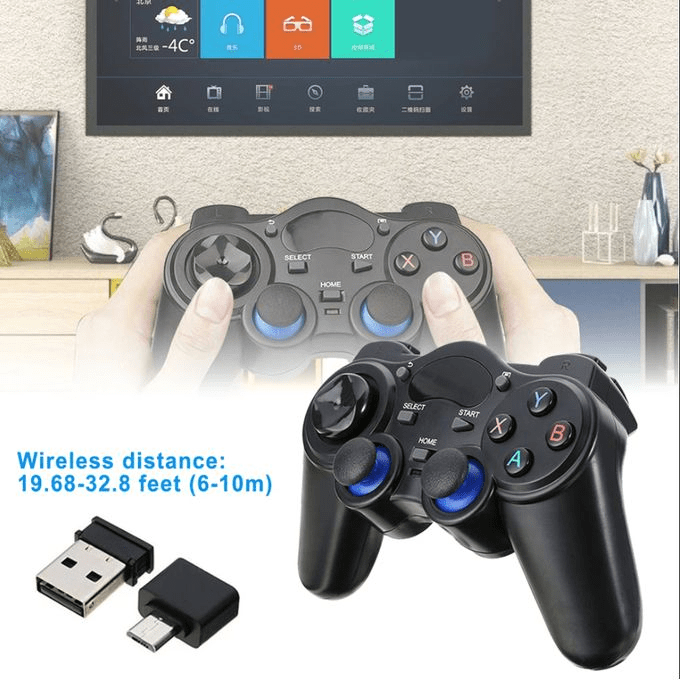
A game pad is a handheld controller that allows gamers to interact with their video games using buttons, triggers, joysticks, and a D-pad. It is commonly used for console gaming, but many game pads are also compatible with PCs, smartphones, and smart TVs.
Unlike a keyboard and mouse setup, game pads offer ergonomic comfort, analog control for movement, and responsive buttons designed for fast-paced gaming.
Types of Game Pads
Game pads come in various types based on design, connectivity, and compatibility. Below are the most common types:
1. Wired Game Pads
- Connect via USB or proprietary connectors.
- Offer zero latency, ensuring instant response in gameplay.
- Typically cheaper than wireless controllers.
- No need for charging, making them reliable for long gaming sessions.
✅ Best For: Competitive gamers who need instant response without lag.
2. Wireless Game Pads
- Connect via Bluetooth or proprietary wireless adapters.
- Offer freedom of movement without cables.
- Rechargeable or battery-powered options available.
- Some models introduce slight input lag, depending on connection quality.
✅ Best For: Casual and console gamers who prefer wireless convenience.
3. Console-Specific Game Pads
Each gaming console has its own official controller, optimized for that system:
- PlayStation DualSense (PS5) – Features adaptive triggers and haptic feedback.
- Xbox Wireless Controller (Xbox Series X/S) – Known for its ergonomic grip and cross-platform support.
- Nintendo Switch Pro Controller – Designed for better comfort and battery life than Joy-Cons.
✅ Best For: Console gamers who want officially optimized controllers.
4. Universal & Multi-Platform Game Pads
- Compatible with PC, consoles, Android, iOS, and smart TVs.
- Offer both wired and wireless modes.
- Great for emulators, cloud gaming, and cross-platform play.
✅ Best For: Gamers who play on multiple platforms.
5. Mobile Game Pads
- Designed specifically for smartphones and tablets.
- Attach directly to the phone (like Razer Kishi) or work via Bluetooth.
- Make mobile gaming more comfortable and precise.
✅ Best For: Mobile gamers who play PUBG, Call of Duty Mobile, and cloud gaming.
6. Arcade & Fight Sticks
- Used for fighting games and retro arcade titles.
- Feature joysticks and large buttons for precision.
✅ Best For: Fighting game enthusiasts and arcade-style gaming.
Key Features to Consider When Buying a Game Pad
To get the best gaming experience, consider the following features when choosing a game pad:
1. Connectivity (Wired vs. Wireless)
- Wired controllers have zero latency, making them ideal for competitive gaming.
- Wireless controllers offer more freedom but may have minor input lag.
💡 Tip: If you prefer wireless gaming, choose a game pad with low-latency Bluetooth or 2.4GHz wireless for better performance.
2. Ergonomic Design & Comfort
- Look for controllers with comfortable grips, textured surfaces, and well-placed buttons.
- Larger controllers are better for long gaming sessions, while compact models suit portable gaming.
3. Button Layout & Customization
- Standard controllers have ABXY buttons, analog sticks, D-pad, triggers, and bumpers.
- Some high-end controllers (like Xbox Elite Series 2) offer remappable buttons and adjustable triggers.
4. Vibration & Haptic Feedback
- Many controllers feature haptic feedback that enhances immersion.
- The PS5 DualSense controller takes this to the next level with adaptive triggers.
5. Battery Life (For Wireless Game Pads)
- Xbox controllers use AA batteries (or rechargeable packs).
- PlayStation DualSense & Switch Pro Controller have built-in rechargeable batteries.
- Some third-party controllers offer longer battery life (20+ hours per charge).
6. Compatibility
- Ensure the game pad works with your gaming platform (PC, console, smartphone).
- Some controllers support multiple platforms, while others are exclusive.
7. Additional Features
- Back paddles and customizable buttons (found in pro controllers).
- Trigger sensitivity adjustments (useful in FPS games).
- RGB lighting & aesthetics (for gaming setups).
Top Game Pads for Different Platforms
For PlayStation (PS5 & PS4)
- Best Choice: PlayStation DualSense (PS5)
- Alternative: Scuf Reflex (Customizable for pro gamers)
- Best For: Immersive gaming with haptic feedback and adaptive triggers.
For Xbox (Series X/S, One)
- Best Choice: Xbox Wireless Controller
- Alternative: Xbox Elite Series 2 (For customizable buttons)
- Best For: PC and Xbox gamers looking for top-tier performance.
For PC Gaming
- Best Choice: Xbox Wireless Controller
- Alternative: Razer Wolverine Ultimate (Customizable, responsive buttons)
- Best For: Comfortable long gaming sessions.
For Nintendo Switch
- Best Choice: Nintendo Switch Pro Controller
- Alternative: 8BitDo SN30 Pro (Great for retro gaming)
- Best For: Improved ergonomics over Joy-Cons.
For Mobile Gaming
- Best Choice: Razer Kishi (Android & iOS)
- Alternative: SteelSeries Stratus Duo (Bluetooth support)
- Best For: Cloud gaming and mobile FPS games.
SEO Keywords for Finding the Best Game Pads Online
If you’re looking for a game pad online, use these SEO-friendly keywords:
- Best wireless game pad for PC
- Xbox Elite Series 2 vs. PlayStation DualSense
- Best mobile game controllers for PUBG
- Affordable gaming controllers for beginners
- Best game pads for fighting games
- Bluetooth controllers for Android & iOS
- High-end game pads for professional gamers
- Best budget game controllers under $50
Using these keywords can help you find top-rated game pads on search engines and e-commerce platforms.
Conclusion
A good game pad enhances your gaming experience by offering comfort, precision, and improved controls. Whether you’re a console gamer, PC enthusiast, or mobile gamer, choosing the right game pad depends on factors like ergonomics, connectivity, compatibility, and extra features.
By selecting the best game pad for your platform, you can enjoy seamless gameplay, better responsiveness, and longer gaming sessions.
Upgrade your gaming setup today with the perfect game pad!


 SIMCEL ONLINE
Leave a Reply