
Introduction
A computer keyboard is one of the most essential peripherals for any computing task, whether you’re a casual user, programmer, gamer, or writer. The right keyboard can improve typing speed, increase comfort, and enhance productivity.
With so many keyboard types, layouts, and features available, choosing the right one can be overwhelming. In this comprehensive guide, we’ll cover everything you need to know about computer keyboards, including their types, key features, benefits, and how to choose the best one for your needs.
What is a Computer Keyboard?
A computer keyboard is an input device that allows users to enter text, numbers, and commands into a computer. It consists of keys arranged in a specific layout, typically including:
- Alphanumeric keys (letters and numbers)
- Function keys (F1–F12)
- Control keys (Shift, Ctrl, Alt)
- Navigation keys (Arrow keys, Home, End)
- Numeric keypad (on full-size keyboards)
Types of Computer Keyboards
Keyboards come in various designs and functionalities, depending on the user’s needs. Here are the most common types:
1. Membrane Keyboards
- The most common and affordable keyboard type.
- Uses a rubber dome and membrane layer to register keypresses.
- Quiet and lightweight but lacks tactile feedback.
✅ Best For: General users who need a budget-friendly keyboard for daily tasks.
2. Mechanical Keyboards
- Uses individual mechanical switches under each key.
- Provides tactile feedback, durability, and faster response.
- Available in different switch types (clicky, tactile, linear).
✅ Best For: Gamers, programmers, and typists who want precision and durability.
3. Wireless Keyboards
- Connect via Bluetooth or a USB receiver.
- Reduces desk clutter and offers portability.
- Requires battery power or rechargeable options.
✅ Best For: Minimalist setups, office users, and people who need portability.
4. Ergonomic Keyboards
- Designed to reduce wrist strain and improve typing posture.
- Features a split keyboard layout or wrist support.
- Helps prevent carpal tunnel syndrome and repetitive strain injuries (RSI).
✅ Best For: Professionals who type for long hours and need comfort and wrist support.
5. Gaming Keyboards
- Mechanical or membrane-based with RGB lighting.
- Features macro keys, customizable buttons, and anti-ghosting.
- Supports fast key actuation for competitive gaming.
✅ Best For: Gamers who need precision, fast response, and custom key functions.
6. Laptop Keyboards
- Built-in keyboards with low-profile scissor switches.
- Compact and designed for portability.
- Some models feature backlit keys.
✅ Best For: Laptop users who prefer built-in keyboards for on-the-go use.
7. Compact & Tenkeyless (TKL) Keyboards
- Compact design without a numeric keypad.
- Ideal for users who need more desk space.
- Lightweight and portable.
✅ Best For: Minimalist setups and users who don’t need a numeric keypad.
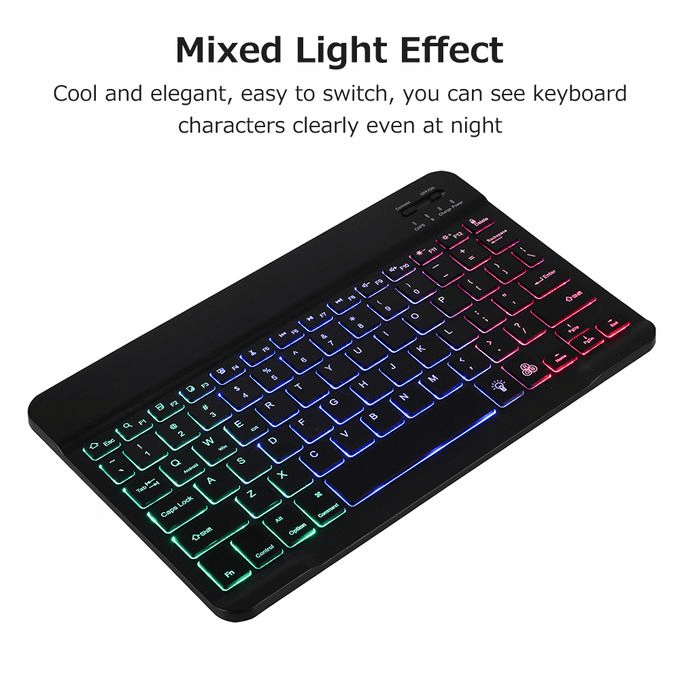
8. Backlit & RGB Keyboards
- Features LED lighting for better visibility in low-light environments.
- Customizable RGB lighting effects for aesthetics.
- Found mostly in gaming and professional keyboards.
✅ Best For: Gamers and professionals who work in dark environments.
Key Features to Consider When Buying a Computer Keyboard
1. Key Switch Type (Membrane vs. Mechanical)
- Membrane switches: Soft, quiet, and budget-friendly.
- Mechanical switches: Durable, tactile, and customizable.
- Scissor switches: Found in laptops; short travel and quiet.
💡 Tip: If you need precision and speed, go for a mechanical keyboard.
2. Connectivity (Wired vs. Wireless)
- Wired keyboards: No battery required, minimal input lag.
- Wireless keyboards: Bluetooth or USB connectivity, portable, and clutter-free.
💡 Tip: If you prefer low-latency gaming, a wired keyboard is best.
3. Ergonomics & Comfort
- Split keyboards and wrist rests help prevent wrist strain.
- Low-profile keys offer a comfortable typing experience.
- Curved designs reduce finger stress.
💡 Tip: If you type for long hours, choose an ergonomic keyboard.
4. Backlighting & Customization
- RGB lighting enhances aesthetics and gaming experience.
- Adjustable brightness settings improve visibility in the dark.
- Macro keys & programmable buttons allow faster commands.
💡 Tip: If you love customization, go for a keyboard with RGB lighting and programmable keys.
5. Key Rollover & Anti-Ghosting
- Key rollover: Detects multiple key presses simultaneously.
- Anti-ghosting: Ensures accurate input without missed keystrokes.
💡 Tip: Gamers should look for NKRO (N-Key Rollover) and 100% anti-ghosting.
6. Battery Life (For Wireless Keyboards)
- Bluetooth keyboards can last weeks to months on a single charge.
- Some models have solar-powered or rechargeable batteries.
💡 Tip: Look for long battery life or fast-charging options.
7. Compatibility
- USB keyboards work with most PCs and laptops.
- Wireless/Bluetooth keyboards work with Windows, macOS, Android, iOS.
- Some gaming keyboards are optimized for specific platforms (PC, Xbox, PlayStation).
💡 Tip: Check the compatibility before buying a keyboard.
Best Keyboards for Different Uses
For Gaming
- 🎮 Best Choice: Razer Huntsman Elite (Optical Switches)
- 🎧 Alternative: Corsair K95 RGB Platinum (Macro Keys)
- 🔥 Best For: Competitive gaming and fast response times.
For Typing & Office Work
- 🖥️ Best Choice: Logitech MX Keys
- 🖋️ Alternative: Keychron K6 (Compact, Wireless)
- 🔥 Best For: Writers, programmers, and office professionals.
For Minimalist & Compact Setups
- ⌨️ Best Choice: Apple Magic Keyboard
- 🎶 Alternative: Logitech K380 (Portable)
- 🔥 Best For: Clean, clutter-free desk setups.
For Ergonomic Comfort
- 🖐 Best Choice: Microsoft Ergonomic Keyboard
- 🔄 Alternative: Kinesis Advantage 2 (Split Layout)
- 🔥 Best For: People who type for long hours.
SEO Keywords for Finding the Best Keyboards Online
When searching for keyboards online, use these SEO-friendly keywords:
- Best mechanical keyboards for gaming
- Wireless keyboards with long battery life
- Best ergonomic keyboards for programmers
- Budget gaming keyboards under $50
- RGB keyboards with customizable lighting
- Best compact keyboards for Mac users
- Best backlit keyboards for office work
- High-quality keyboards for fast typing
Using these keywords in Google searches, product listings, and blog content will help you find the best keyboard for your needs.
Conclusion
A high-quality keyboard can improve typing speed, gaming performance, and overall comfort. Whether you’re a gamer, writer, office worker, or casual user, selecting the right keyboard type, switch, and features is crucial.
By considering your specific needs and budget, you can invest in a keyboard that enhances productivity, comfort, and efficiency.
⌨️ Upgrade your typing experience today with the perfect keyboard!


 SIMCEL ONLINE
Leave a Reply